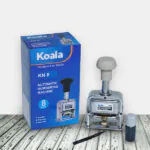
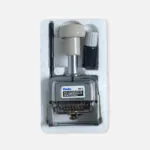
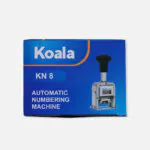
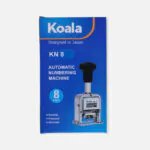
Koala Auto Numbering Machine – Durable, Precise and Accurate
Make repetitive document numbering easier with the Koala Auto Numbering Machine from Elmate Stationery. Designed for durable, precise, and accurate numbering, this automatic numbering machine is a practical tool for offices, businesses, educational institutions, and administrative workplaces.
Whether you need to number invoices, receipts, forms, registers, certificates, or other documents, an automatic numbering machine helps maintain an organised and consistent numbering process. Instead of manually writing each number, you can use its automatic numbering mechanism to make repetitive tasks more convenient.
The Koala Auto Numbering Machine is available in three digit variations: 6 Digits, 8 Digits, and 10 Digits. Choose the suitable variation according to the number of digits required for your documents and records.
Koala Auto Numbering Machine – Available Variations
Choose from three available digit options:
1. Koala Auto Numbering Machine – 6 Digits
The 6-digit variation is an option for numbering documents that require a six-digit number format. It can be used for routine office documentation, forms, and record-keeping tasks.
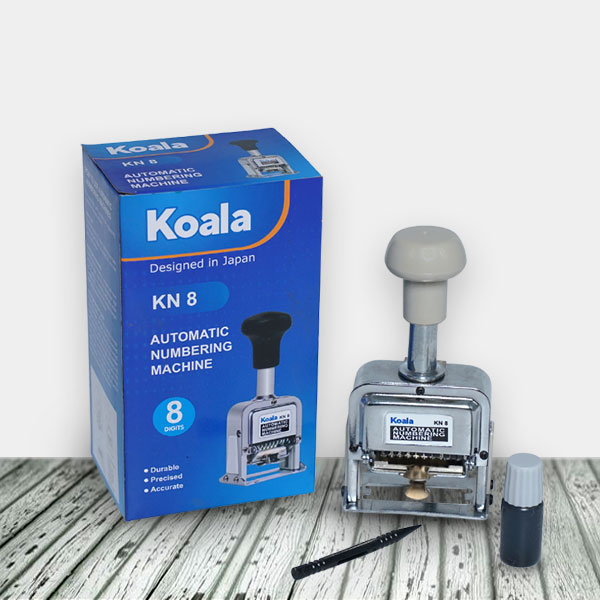
2. Koala Auto Numbering Machine – 8 Digits
The 8-digit variation provides an eight-digit numbering format. It is suitable for users whose documents or records require a longer numerical sequence.
3. Koala Auto Numbering Machine – 10 Digits
The 10-digit variation provides a ten-digit numbering format for documents and records that require more numerical positions.
Which variation should you choose? Select 6, 8, or 10 digits based on the numbering format required for your work.
Key Features of Koala Auto Numbering Machine
- Durable Construction: Designed for repeated numbering tasks and regular use.
- Precise and Accurate Numbering: Helps produce consistent numerical impressions on documents.
- Three Digit Options: Available in 6-digit, 8-digit, and 10-digit variations.
- Adjustable Numbering Movement: Allows you to select how frequently the number changes.
- Adjustable Figure Wheels: Set the required numerical figures before stamping.
- Ink Pad Mechanism: Includes an ink pad system for numbering impressions.
- Multiple Surface Applications: Suitable for registering numbers on various surfaces.
What Is an Automatic Numbering Machine?
An automatic numbering machine is a mechanical numbering stamp used to print sequential numbers on documents and other suitable surfaces. It contains adjustable figure wheels that display the required numbers and an automatic movement mechanism that changes the number according to the selected setting.
It is commonly used where documents need unique or sequential identification numbers. The automatic mechanism helps reduce repetitive manual work and supports organised record management.
Common Uses of an Auto Numbering Machine
The Koala Auto Numbering Machine can be useful for different numbering and documentation tasks, including:
- Invoices and Receipts: For assigning reference numbers to financial documents.
- Office Documents: For numbering forms, applications, and administrative paperwork.
- Registers and Records: For maintaining organised numerical references.
- Certificates and Forms: For adding identification numbers to printed documents.
- Business Documentation: For numbering records and other business paperwork.
- Educational Institutions: For numbering forms, registers, and institutional documents.
The machine is suitable for registering numbers on various surfaces. Always check that the surface and material are appropriate for the machine’s stamping mechanism and ink.
How to Use the Koala Auto Numbering Machine
Follow these steps to set up and operate the automatic numbering machine correctly.
1. How to Ink the Numbering Machine
Before using the machine, make sure the ink pad has the appropriate numbering-machine ink.
- Press the handle (2) down halfway.
- Locate and remove the ink pad clasp (3).
- Take out or access the ink pad as directed by the machine’s mechanism.
- Apply an appropriate amount of numbering-machine ink onto the pad.
- Refit the pad and clasp securely before use.
Use only compatible numbering-machine ink. Applying too much ink may affect the clarity of the impression, so use an appropriate amount.
2. How to Set the Numbering Movement
The action indicator (1) and index plate (6) control how frequently the number changes.
- Hold and release the action indicator (1) as required by the mechanism.
- Move the indicator along the index plate (6) to the desired setting.
- Select the number that matches your required repeat movement.
Example: Setting the action indicator to “3” means the number changes after being repeated three times.
This setting allows you to control the numbering sequence according to your documentation requirements.
3. How to Set the Desired Figures
You can adjust the figure wheels to display the number you want to start with.
- Press the handle down.
- Push the handle lock to the right.
- Use the attached plastic stick (8) to turn the figure wheels (5) consecutively forward.
- Set each digit wheel to the required starting number.
- Check the displayed figures before releasing the handle and starting the numbering process.
How to Suppress Unwanted Leading Zeros:
If you do not want zeros to appear before the first required digit, you can make those digit wheels inactive.
- Use the plastic stick (8) to bring the unwanted digit wheel to zero.
- Press the wheel forward slightly.
- Then press it down as instructed by the mechanism.
- The selected digit will sink into the machine and will not appear in the printed impression.
Repeat the process for any other leading digit that should not appear.
4. How to Get a Clear Numbering Impression
For a more visible printed number:
- Place the document on a thin stack of soft paper or a suitable rubber backing.
- Keep the surface stable while stamping.
- Press the handle evenly to produce the impression.
- Make sure the ink pad has an appropriate amount of compatible ink.
Using a soft backing helps provide better contact between the numbering wheels and the paper surface.
Important Cautions and Maintenance Instructions
Proper ink selection, cleaning, and storage can help maintain the performance of your Koala Auto Numbering Machine.
1. Use the Correct Numbering Machine Ink
Always use ink specifically designed for numbering machines. The correct ink helps maintain the ink pad and supports the machine’s performance over time.
Never use ordinary stamp ink or printing ink. Also avoid inks containing chloride, fluorine, nickel, iodine, alkali, or alkeno-acetic acid, as these may permanently damage the machine.
Using incompatible ink can affect the ink pad and the machine’s internal mechanism.
2. Use a Soft Backing While Numbering
Always place the paper on a thin stack of soft paper or a suitable rubber backing when stamping. This helps create a more visible and consistent printing impression.
3. Clean the Moving Parts When Necessary
Dirt and dried ink can interfere with the machine’s movement. If the numbering mechanism does not operate properly, the supplied instructions recommend cleaning the moving parts with benzine or kerosene oil using a brush.
Safety precaution: Benzine and kerosene are flammable. Use any such cleaning solvent only if permitted by the manufacturer’s instructions, in a well-ventilated area and away from flames, sparks, heat, and ignition sources. Do not spray solvents casually onto the machine. Allow all parts to dry completely before using it again.
4. Clean and Store the Machine When Not in Use
If the numbering machine will remain unused for an extended period, the supplied instructions recommend cleaning it with an appropriate cleaning solvent, placing it in its storage box, and keeping it in a dry place.
Always follow the manufacturer’s cleaning guidance and ensure the machine is completely dry before storage.
Why Choose Koala Auto Numbering Machine?
The Koala Auto Numbering Machine is a useful addition to workplaces that regularly handle numbered documents and records.
- Consistent Numbering: Helps maintain a systematic numbering process.
- Adjustable Settings: Allows users to select the starting figures and repeat movement.
- Multiple Digit Variations: Choose from 6, 8, and 10-digit options.
- Practical for Regular Tasks: Suitable for repetitive office and administrative numbering.
- Maintenance-Friendly Design: Removable ink pad and accessible adjustment mechanism support routine care.
Related Office Stationery and Document Management Products
An organised workplace requires more than a numbering machine. You can combine it with other office stationery and document-handling tools from Elmate Stationery.
Buy Koala Auto Numbering Machine in Bangladesh
Looking for a Koala Auto Numbering Machine in Bangladesh? Shop online at Elmate Stationery and choose from 6-digit, 8-digit, and 10-digit variations.
Whether you need a numbering machine for office documents, business records, invoices, receipts, or administrative paperwork, the Koala Auto Numbering Machine offers adjustable numbering movement and figure settings to support your work.
Explore the available variations and order your preferred Koala Auto Numbering Machine from Elmate Stationery.
Frequently Asked Questions (FAQ)
1. What variations are available for the Koala Auto Numbering Machine?
The Koala Auto Numbering Machine is available in three variations: 6 Digits, 8 Digits, and 10 Digits.
2. What is an Auto Numbering Machine used for?
An auto numbering machine is used to print sequential numbers on documents and other suitable surfaces. It is commonly used for invoices, receipts, forms, registers, and office records.
3. How do I change the starting number?
Press the handle down, push the handle lock to the right, and use the attached plastic stick to turn the figure wheels forward until the desired starting number is displayed.
4. What does the action indicator do?
The action indicator controls how frequently the number changes. For example, setting it to “3” means the number changes after being repeated three times.
5. Which ink should I use in an automatic numbering machine?
Use ink specifically designed for numbering machines. Avoid ordinary stamp ink, printing ink, and inks containing the incompatible substances listed in the product instructions.
6. How can I prevent leading zeros from appearing?
Use the attached plastic stick to bring the unwanted leading digit wheel to zero, press it forward slightly, and then press it down. The selected digit will sink into the mechanism and will not appear in the impression.
7. How should I maintain the numbering machine?
Use compatible numbering-machine ink, keep the moving parts clean, remove dirt and dried ink when necessary, and store the machine in its box in a dry place when not in use. Follow the manufacturer’s cleaning instructions when using any cleaning solvent.
8. Can I use the numbering machine on different surfaces?
The machine is suitable for registering numbers on various surfaces. For the best result, use an appropriate surface and compatible numbering-machine ink.